Feature guide

File management

Work efficiently with modern Windows paths, multiple storage devices, archives, catalogs, and safer file-operation dialogs.

Unicode and long paths support

  • Work with files and folders whose names use characters from different languages, emojis, and other Unicode symbols.
  • When Windows long paths are enabled, local and UNC paths can go beyond the traditional MAX_PATH limit and use the Windows extended-length limit of about 32,767 characters.
  • Browse, Copy, Move, Rename, Delete, and Create deeply nested folders and very long file names directly from the panels.
  • The core file handling paths use Unicode-aware Windows APIs, so names no longer have to fit the active system code page.
  • Code based on our prototype and partially derived from Sally fork source code (author 0xeb) refined for Samandarin.
Unicode file and folder names in a Samandarin panelLong path displayed in Samandarin

Storage-aware concurrent Copy and Move

  • Copy and Move operations can run concurrently when they use independent storage devices, while operations that would compete for the same storage are serialized.
  • Choose sequential or storage-aware scheduling and configure parallel-file limits for SSD and NVMe storage.
  • The File Operation Progress window presents multiple active transfers together while preserving pause, resume, error handling, and queue controls.

Copy/Move between plugin file systems and archives

  • Move data directly between plug-in file systems and archives—for example, between FTP and an archive, two FTP servers, or two different archives.
Copy between a plug-in file system and an archive

Multi-target copy

  • Press Shift+F5 to copy selected files and folders into every selected directory in the target panel.
Multi-target copy dialog

Open archives by content

  • Press Ctrl+PgDown to probe the selected file and open supported archive content even when the extension is missing or incorrect.
  • Browse self-extracting archives and package-based Office or OpenDocument files without changing normal Enter and double-click behavior.

Disk catalogs and recursive file lists

  • Create and browse Total Commander DiskDir-compatible catalogs containing file names, sizes, and timestamps without storing file contents.
  • The Make File List command can recursively include subdirectories for disk and archive panels.
DiskDir-compatible disk catalogRecursive file list output

Mounted folder volumes

  • Volumes mounted into NTFS folders appear in the Change Drive menu and can optionally be shown on the Drive Bar, with configurable path format and volume labels.
  • Path details can be hidden, and Windows Sandbox volumes can optionally be included.
  • Calculate Occupied Space can stay on the same file system to avoid following directory links and mounted folders.
Mounted folder volumes in the Drive menuMounted folder volume configuration

Path autocomplete

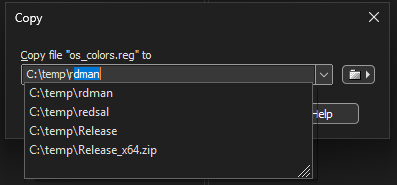
  • Paths are suggested while typing in Copy, Move, Quick Rename, Create Folder, and Change Directory dialogs.
Path autocomplete suggestionsPath autocomplete configuration

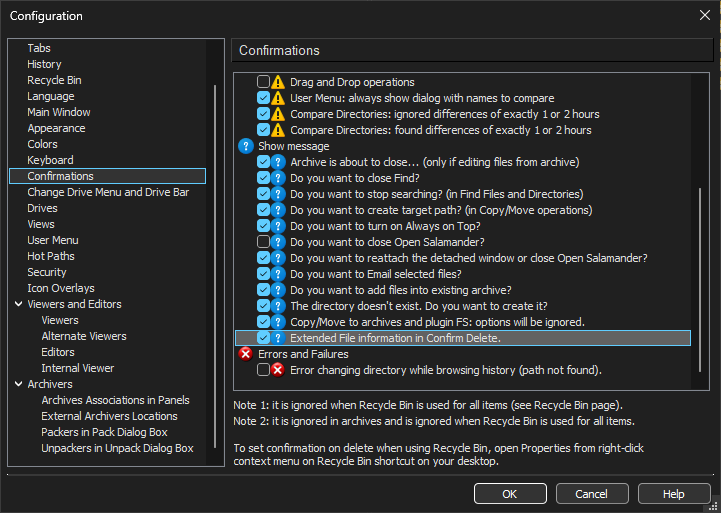
Extended Confirm Delete

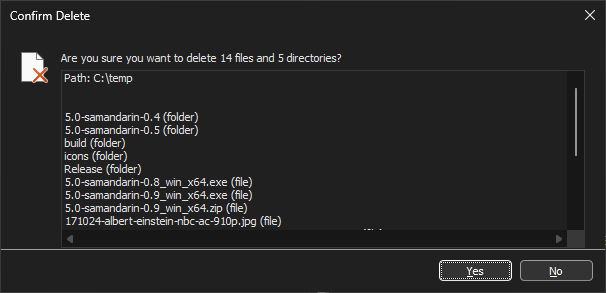
  • Display a table of selected file names before deletion so large selections can be reviewed.
Extended Confirm Delete dialog with selected filenamesExtended Confirm Delete dialog with multiple selected files