Unofficial community fork
It evolves the original project with enhancements and new features while staying compatible with the upstream code and plugin ecosystem.
Download latest release
Loading latest GitHub release data...
- Installer/Extract portable ~ 16.1 MB
- ZIP archive ~ 24.2 MB
Included Features Overview
Unicode and long paths support
- Work with files and folders whose names use characters from different languages, emojis, and other Unicode symbols.
- When Windows long paths are enabled, local and UNC paths can go beyond the traditional
MAX_PATHlimit and use the Windows extended-length limit of about32,767characters. - Browse, Copy, Move, Rename, Delete, and Create deeply nested folders and very long file names directly from the panels.
- The core file handling paths use Unicode-aware Windows APIs, so names no longer have to fit the active system code page.
- Code based on our prototype and partially derived from Sally fork source code (author 0xeb) refined for Samandarin.
Internal Viewer
- Support for Unicode encoding in text files.
- Optional status bar with Line/Column number, counting selected characters and lines, zoom settings.
- Zoom text with
Ctrl + mouse wheelorCtrl + Num +/Ctrl + Num -. Zoom reset withCtrl + Num 0. - Optional line numbers for easier navigation in text files.
- Log View Mode automatically refreshes growing files and keeps the view at the end, making the Internal Viewer useful for live logs.
Translations
- Automatic translate with OpenAI API (model
gpt-5.4-nano) with our own custom localization logic. - Few scripts partially derived from Sally fork source code (author 0xeb).
Portability
- Save the Configuration into file storage instead of Registry.
Manage configurations
- Reworked welcome dialog with configuration management options.
- Configuration import and export support.
- Simple wizard for restoring configurations.
- Choose between locations for target configuration.
Split panels into detached window
- You can have each side in separate window.
Tabbed Panels
- One of the most wanted features over last 15 years.
- When tabs overflow the tab bar, you can scroll the tab bar with the mouse wheel.
- You can switch between tabs on one side when holding right mouse button and scrolling with the mouse wheel.
Shared/separate History
Dark Mode
- Complete dark mode support for all components, windows, plugins etc.
DPI Awareness
- Sharper interface rendering on high-DPI and mixed-DPI Windows displays.
- The application scales dialogs, controls, icons, and panel content more consistently when moving between monitors with different scaling settings.
Columns from Windows Explorer
- For detailed view, you can choose to show any Windows Explorer column.
Configurable Command Shell Application
- Dynamically loads Windows Terminal profiles for quick command shell selection.
- Press
Shift+Num /to open the configured command shell as administrator.
Mounted folder volumes
- Volumes mounted into NTFS folders appear in the Change Drive menu and can optionally be shown on the Drive Bar, with configurable path format and volume labels.
- Calculate Occupied Space can stay on the same file system to avoid following directory links and mounted folders.
Tree View panel
- Docked or floating panel with tree view structure of the active disk panel.
- Based on fgodoy changes.
User Folders
- Added missing user folders for easier access.
Copy/Move between plugin-FS and archives
- Support for file operations between plugin-FS and archives (for example between FTP and archives, between different FTP servers, different archives, etc).
Multi-target copy
- Press
Shift+F5to copy selected files and folders into every selected directory in the target panel.
Disk catalogs and recursive file lists
- Create and browse Total Commander DiskDir-compatible catalogs containing file names, sizes, and timestamps without storing file contents.
- The Make File List command can recursively include subdirectories for disk and archive panels.
Extended Confirm Delete
- Show the table with filenames of selected files to delete.
Panel item info tooltip
- Shows the tooltip with summary info about directory or file.
- For known file types, information that might interest users is displayed (for images, this is the size or color depth, for music files, this is the length or author, etc).
Autocomplete path
- Autocomplete path in Copy/Move/Quick Rename/Create Folder/Change Directory dialog.
- Paths are suggested when typing in the path field.
Salamatrix Extension Framework
- Run persistent, manifest-backed extensions with native menus, context commands, settings, localization, optional language runtimes, and a dedicated Extension Bar.
- Explore the Salamatrix Extension Framework and its bundled extensions.
Digitally signed
- All binary files including installer are digitally signed.
Plugin Catalog
Plugin catalog sources:
- Stable: https://samandarin.krtkovo.eu/catalogs/plugins-stable.json
- Unofficial 3rd party: https://samandarin.krtkovo.eu/catalogs/plugins-unofficial.json
- Extension Runtimes: https://samandarin.krtkovo.eu/catalogs/extension-runtimes.json
Catalog entries can provide their own icons. Plugin Updates can download and install plugin, runtime, or extension packages automatically, resolve required catalog dependencies, and offer them for installation together.
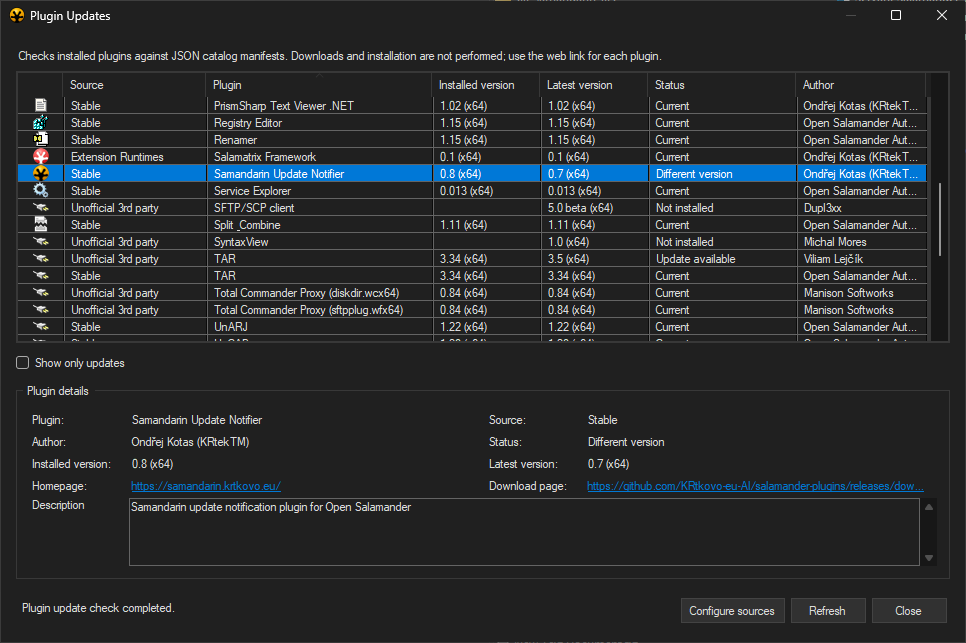
Explore the available plugins in Plugin catalog overview or directly in the Salamander application via the Plugin Updates window in the Samandarin Update Notifier plugin.
Samandarin Fork Overview
Author & Motivation
Open Salamander: Samandarin is introduced by Ondřej Kotas (KRtekTM). Instead of coming from a traditional C++ background, Ondřej is a C# developer and QA test/automation & AI specialist who uses OpenAI Codex to rapidly prototype and implement new ideas. The fork exists so AI-written code can evolve separately without risking the quality of the upstream project while development practices mature.
Fork Name Inspiration
The “Samandarin” name is a three-way pun that pays homage to the Salamander legacy:
- Fire salamander – the black-and-yellow amphibian that inspired the original project.
- Samandarin – the natural toxin secreted by that salamander, symbolising a spicy, daring twist — just like our AI-crafted changes.
- Mandarin orange – the vibrant citrus fruit with fresh color palette.
Together they promise the same Salamander DNA with a spicy hint of danger.
Installation Notes
Samandarin writes its configuration to a dedicated registry hive named "Open Salamander Samandarin" to avoid interfering with an official installation. If you previously tried the "tabbed panels PoC" pre-release, manually clean the legacy registry keys because that build still stored settings in the original location.
Origin Overview
The name Servant Salamander came from a brainstorming session between Petr Šolín and his friend Pavel Schreib. At the time, the best-known file managers were the aging Norton Commander and the increasingly popular Windows Commander. They wondered why a file manager should be called a commander at all: a good file manager serves its users rather than commands them. That idea led to the name Servant Salamander.
The original version of Servant Salamander was developed by Petr Šolín while he was studying at the Czech Technical University. He released it as freeware in 1997. After graduating, Petr Šolín founded Altap together with Jan Ryšavý. In 2001, they released the first shareware version of the program. In 2007, the project was renamed Altap Salamander with the release of version 2.5. Many other programmers and translators have contributed to the project over the years. In 2019, Altap was acquired by Fine. After the acquisition, Altap Salamander 4.0 was released as freeware. In 2023, the source code was released under the GPLv2 license as Open Salamander 5.0.
The Samandarin fork continues this story by blending the original Salamander DNA with AI-driven enhancements, keeping development moving while inviting adventurous contributors to explore and extend the project.
We would like to thank Fine for making the open-source release of Salamander possible.
Resources
- Salamander users community forum
- Open Salamander 5.0 original project
- Open Salamander SDK 5.0 Unofficial
- Altap Salamander Website
- Altap Salamander 4.0 features
- Altap Salamander 4.0 documentation
- Servant Salamander and Altap Salamander changelogs
- Altap Salamander on Wikipedia
Written About Us
- (Czech) Root.cz: Open Salamander má aktivně vyvíjený komunitní fork Samandarin
- (Czech) Lupa.cz: Legendární český Salamander má novou verzi zdarma, přináší zásadní novinky a vylepšení
- (Czech) AktivMedia.cz: Nová verze legendárního správce souborů Salamander přináší zásadní vylepšení
- (Czech) Magazin.Chatujme.cz: Neoficiální fork českého správce souborů Salamander přidal karty a tmavý režim
License
Open Salamander is open-source software licensed under GPLv2 or later.
Some individual files and libraries use different but compatible licenses.